

Introduction
Pinterest traffic for affiliate blog is one of the biggest opportunities for beginners who want consistent website visitors without depending on social media followers or paid ads. Many new bloggers struggle to get traffic, but Pinterest works differently — it acts more like a search engine where users actively look for ideas, guides, and solutions.
This makes Pinterest a powerful platform for affiliate bloggers who want long-term traffic without constantly creating videos or showing their face. If you are following a faceless affiliate marketing strategy (link Blog 4 here), Pinterest can become one of the easiest ways to bring targeted visitors to your affiliate blog.
Pinterest works more like a search engine than social media. People actively search for ideas, guides, and solutions. This makes it a powerful platform for affiliate bloggers who want long-term traffic without constantly creating videos or showing their face.
If you are following a faceless affiliate marketing strategy , Pinterest can become one of the easiest ways to bring targeted visitors to your blog.
In this beginner-friendly guide, you’ll learn a simple Pinterest strategy that can help bring long-term traffic to your affiliate blog.
Disclosure: This post may contain affiliate links. I may earn a small commission at no extra cost to you if you choose to purchase through my link. I only recommend tools that are beginner-friendly and genuinely useful for starting a blog.
Why Pinterest Traffic Works for Affiliate Blogs
Pinterest is different from most platforms.
Posts on Instagram or TikTok usually disappear quickly, but Pinterest pins can continue generating traffic for months — sometimes even years.
Here’s why many beginners use Pinterest:
Beginner-friendly
You don’t need followers to start getting clicks.
Search-based platform
Pins appear when users search for specific topics.
Long-lasting traffic
One pin can keep bringing visitors long after publishing.
Free to start
No advertising budget required.
Faceless content friendly
You can create simple pins without showing your face or recording videos.
Because users on Pinterest are already searching for solutions, the traffic often converts better than random social media views.
Pinterest Traffic for Affiliate Blog: Step-by-Step Strategy
1. Created a Pinterest Business Account
Switching to a Pinterest Business account gives access to analytics and performance insights
This helps you understand:
- which pins get clicks
- what topics perform best
- how your traffic grows over time
It’s free and takes only a few minutes to set up.
If your blog is still new, you can read this guide on how to write your first faceless blog post to understand the basics.
2. Optimized My Profile with Keywords
Pinterest uses keywords to understand your content.
Add relevant keywords naturally in:
- profile description
- board titles
- board descriptions
Example keywords:
affiliate marketing tips
blogging for beginners
passive income ideas
Pinterest traffic strategy
Clear keywords help Pinterest show your pins to the right audience.
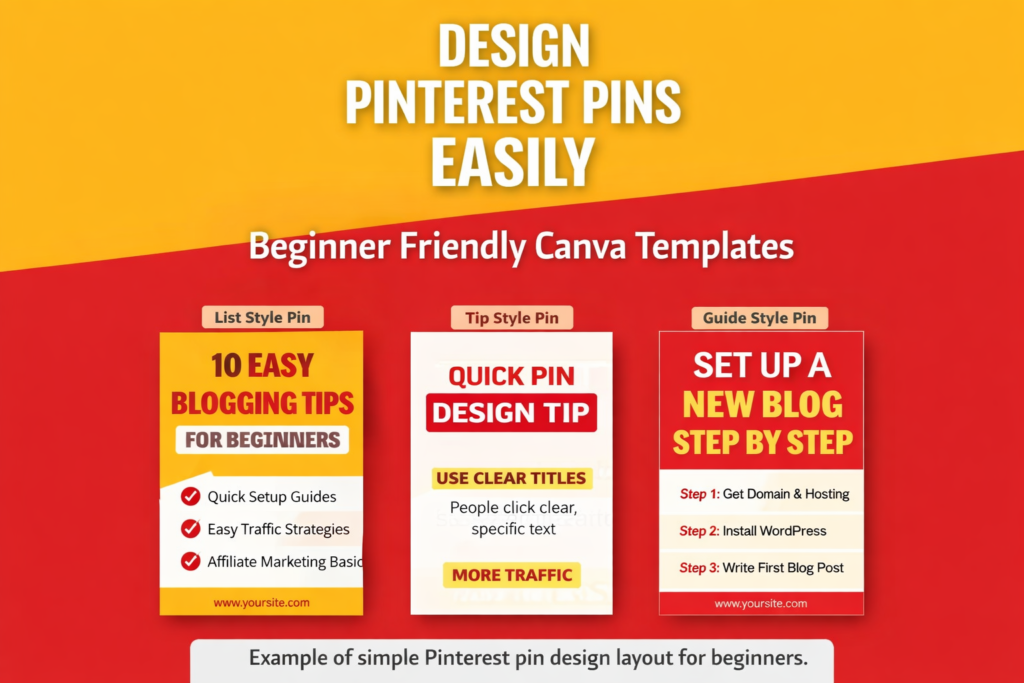
3. Create Simple, Clickable Pins
Pinterest users prefer pins that are easy to read and understand quickly.
Effective pin design usually includes:
- short title
- bold readable fonts
- minimal colors
- clear topic focus
Avoid complicated designs.
Simple and clear pins often perform better than highly aesthetic designs.
Many beginners use Canva because it makes designing pins fast and beginner-friendly.
If you want an easy way to design Pinterest pins, you can try Canva here.
If you’re unsure whether the free version is enough, this comparison of Canva Free vs Pro for bloggers explains the differences clearly.
4. Post Consistently
Consistency helps Pinterest trust your account.
You don’t need to post many pins every day.
Even 1 pin daily is enough to start building momentum.
Consistency matters more than quantity, especially in the beginning.
5. Link Pins to Helpful Blog Content
Each pin should connect to a blog post that provides useful information.
Make sure the pin topic matches the blog topic.
Example:
Pin topic: Pinterest traffic tips
Blog topic: Pinterest traffic strategy guide
When your pin and blog content match, visitors are more likely to stay and explore your website.
This improves engagement and helps increase Pinterest traffic for affiliate blog growth over time.
6. Track Analytics and Improve Strategy
Pinterest analytics shows what is working.
Look at:
- impressions
- Saves
- Outbound clicks
Create more pins similar to your best-performing designs.
Many beginners improve faster simply by repeating what already works.
Understanding common Pinterest mistakes beginners make can also help improve reach.
7. Focus on Long-Term Growth
Pinterest traffic usually builds gradually.
Many bloggers start seeing clicks within a few weeks of consistent posting.
Pins can continue bringing traffic even when you are not actively creating new content.
Over time, this creates a steady flow of visitors to your affiliate blog.
You can also explore this Pinterest traffic growth strategy to increase your reach further.
Tools Helpful for Pinterest Traffic
Below are beginner-friendly tools that make the process easier:
Canva
Used for designing simple Pinterest pins quickly.
Pinterest Trends
Helps find topics people are searching for.
Pinterest Analytics
Shows which pins generate the most clicks.
These tools are simple to use and free to start.
Tips for Beginners Using Pinterest Traffic
Start small but stay consistent
Even one pin daily can grow traffic over time.
Use keywords naturally to improve Pinterest traffic for affiliate blog visibility.
Include keywords in pin titles and descriptions.
Focus on clear designs
Readable fonts perform better than decorative styles.
Track performance regularly
Create more pins based on what works.
Be patient
Pinterest traffic grows steadily, not instantly.
FAQs About Pinterest Traffic for Affiliate Blogs
Can Pinterest really drive traffic to a new blog using a Pinterest traffic for affiliate blog strategy?
Yes. Pinterest can generate traffic even if your blog is new and has low domain authority.
Many beginners use Pinterest to get their first visitors.
How many pins should I create per blog post?
Start with 2–3 pins per blog post.
Later, you can create additional designs to increase reach.
How long does it take to see results?
Some bloggers see initial clicks within a few weeks.
Traffic usually improves with consistent posting and optimized keywords.
Conclusion
Pinterest traffic for affiliate blog can be a powerful long-term strategy, especially for beginners who prefer a simple and sustainable way to grow website visitors.
It does not require followers, video creation, or paid ads to get started.
With consistent pin creation and helpful blog content, Pinterest can bring long-term traffic and support affiliate marketing growth.
Small actions done consistently can lead to meaningful results over time.
Follow on Pinterest for More Traffic Tips
If you want more strategies on Pinterest traffic, faceless blogging, and affiliate marketing, you can follow my Pinterest profile here:
Follow me on Pinterest
I regularly share new pin ideas, traffic tips, and beginner-friendly strategies.
Leave a Reply